How to Automate Tip Distribution in Your Restaurant
Restaurant tip distribution automation needs repeatable rules, reviewed shifts and a clear manual payroll handoff.
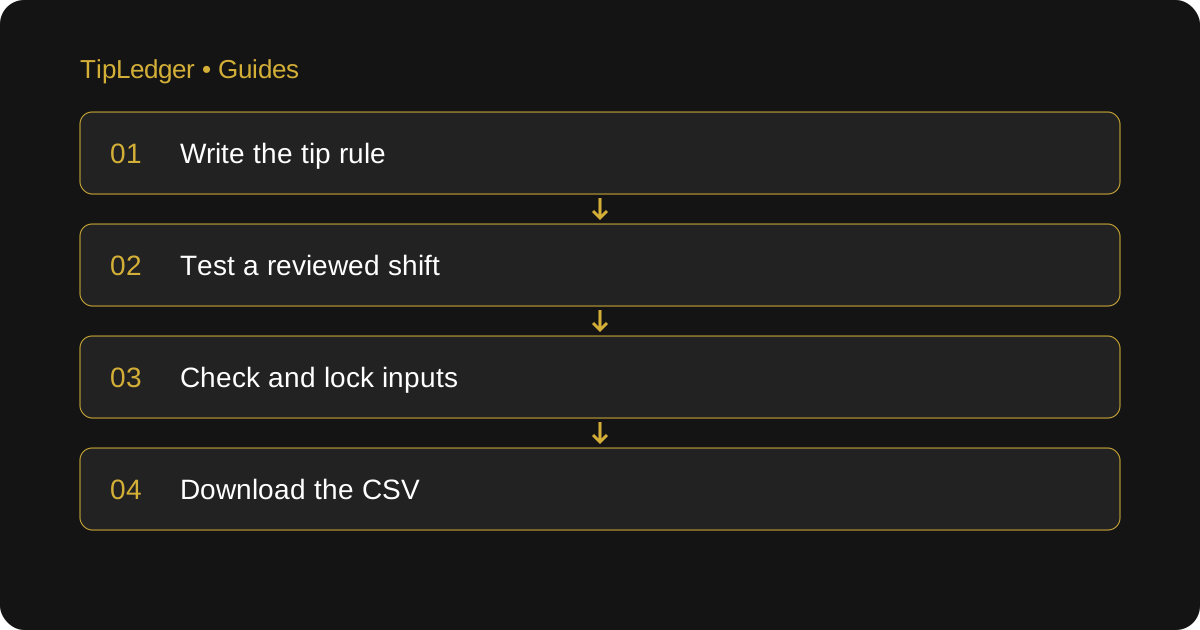
Automate the calculation you can explain
Restaurant tip distribution automation is a repeatable calculation based on documented rules and reviewed shift figures. A manager closing a restaurant needs to know who worked, which tip-out rule applies and whether the source totals are complete. Automation can apply a documented calculation repeatedly, but it cannot decide whether an employee’s hours were entered correctly or whether a house policy is lawful. Start with a process you can explain on paper, then test that same process in software.
TipLedger calculates tip shares from figures you enter or import yourself. It has no live POS connection and does not send money to employees or run payroll. Its daily workspace, shift reports and CSV downloads help organize the calculation and handoff. If you need automatic bank payouts or a direct payroll integration, confirm that requirement separately before choosing a tool.
Put the house rules into a testable form
List each shift type and the rules used for that shift. Name the contribution basis: sales, tips or another approved basis. Record the roles, percentages or points, the hours included in distribution and how partial shifts are handled. Identify the effective date and who can approve a change. Have the eligibility and any deductions checked against the applicable rules before configuring them.
Separate rules that look similar but produce different results. Three percent of sales is not three percent of tips. A pool distributed by hours is not an equal split per employee. If lunch and dinner use different rules, create two test shifts rather than combining them into a single example. Keep the approved written policy alongside the settings so a future manager can understand why those settings exist.
Run a small sample by hand first
Here is an illustrative calculation, not a recommended tip policy. Assume an eligible support pool receives $90 under the restaurant’s approved rule. Two eligible staff members worked four and two pool hours. Six hours share $90, which gives $15 per pool hour. Their shares are $60 and $30. Check that the shares return exactly to the source pool.
Enter the same sample into the software and inspect the result. Then change one input: the second employee worked three hours rather than two. The pool is still $90, but seven hours now share it. The exact shares are approximately $51.43 and $38.57 when rounded to cents. If the result differs, check the rule basis and role assignments before assuming the software is wrong. Keep this sample as a reference for training and later settings changes.
Test the shifts that cause trouble
A quiet shift is useful for the first check, but it does not test the whole operation. Include a double shift, a staff member who changes roles, an employee who leaves early, a shift with zero tips and a correction discovered after review. Check whether the same person’s hours belong in separate pools or in one combined pool under the approved policy.
Also test a pool with no eligible hours. A division-by-zero situation needs review, not an invented payout. For cents that do not divide evenly, document the rounding method and check that the final shares add up. Do not put unexplained differences into a miscellaneous line just to make the report balance. If a rule cannot be represented accurately, keep that calculation outside the automated workflow until the mismatch is resolved.
Build a closing routine around the inputs
At close, compare the charged-tip total with the matching POS business-day report. Confirm staff names, roles, sales, tips and hours before approving the shift. Keep cash already received distinct from cash still payable. Check that a shift imported or entered earlier is not entered again. Review any adjustment separately instead of quietly reducing the pool.
Assign a reviewer and use a consistent cutoff for corrections. TipLedger lets managers review and lock shifts; its totals update from the numbers entered, not from a live POS feed. That means an incorrect input can produce a neatly calculated incorrect result. A short input review remains part of the job even after the arithmetic becomes automatic.
Keep the employee explanation and payroll handoff clear
Show each employee the rule and their own breakdown. Explain the pool total, the basis used and the final share without exposing private records belonging to colleagues. In TipLedger, employee access uses a manager-provided name code and PIN. It is read-only, and managers decide how much breakdown employees can see. Check the employee view during testing rather than assuming it displays everything a manager sees.
For payroll, roll up reviewed shifts for the exact pay period. Download the CSV, check its totals and confirm the receiving provider’s format. TipLedger has no direct connection to payroll providers; the report must be imported where supported or re-keyed. A report is not a payment confirmation. Keep the person running payroll responsible for checking what is actually paid and reported.
Switch over with evidence from your own shifts
Run a representative period through the new process alongside your current reviewed calculation. Compare employee-level shares, source totals, exceptions and the time each review takes. Record why any result differs. Do not abandon the old process simply because a sample screen looks cleaner. Switch when the approved rules can be reproduced and the responsible managers understand how to correct an input.
After switching, review the first several payroll handoffs and retain the source records. Use the audit trail to find key changes and the written policy to explain the calculation. Automation works best when it makes the same rule repeatable and visible. It does not guarantee fewer disputes, a particular number of hours saved or legal compliance; those depend on the policy, inputs and review process you actually use.
Sources and further reading
- U.S. Department of Labor: Recordkeeping (Fact Sheet 21)
Primary guidance on the hours, pay and supporting records behind the shift review.
- IRS: Reporting Tip Income (Publication 531)
Primary guidance on daily tip records, cash and charged tips, and tip reporting.
Ready to simplify your tip distribution?
Try TipLedger free for 30 days. No credit card required.
Start Your Free Trial