How to Choose the Right Tip Management Software for Your Restaurant
Restaurant tip management software should reproduce your actual tip rules, handle exceptions and provide the employee view and payroll records you need.
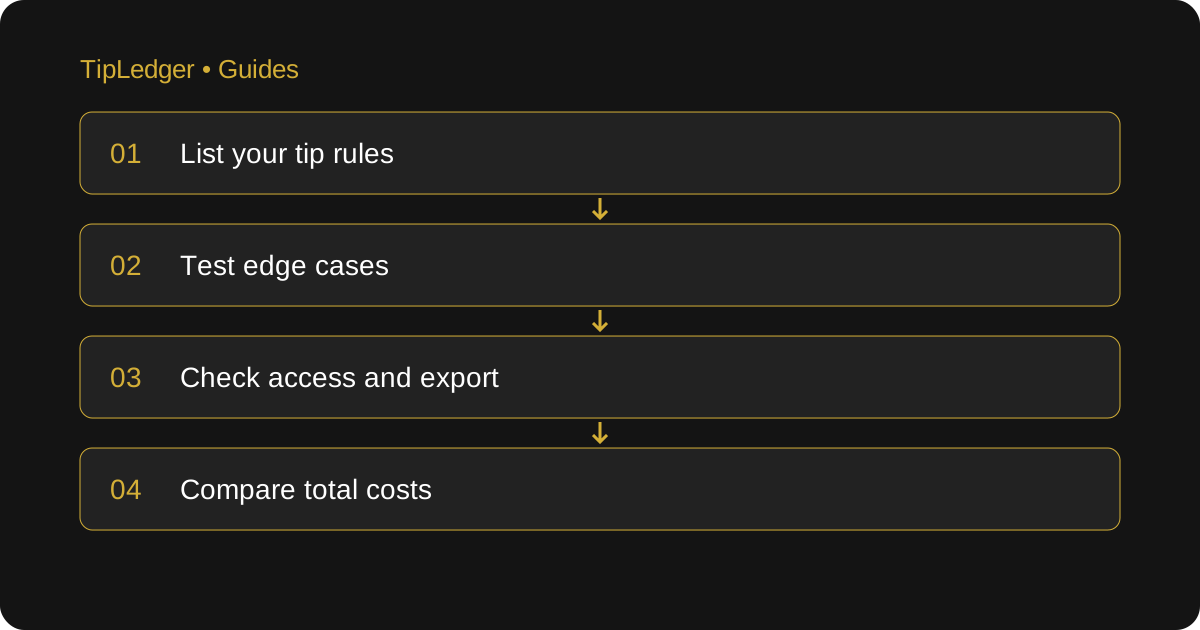
Start with the job your restaurant needs done
Restaurant tip management software calculates employee tip shares, records shifts and prepares tip records for the payroll handoff. Before comparing screens, write down the problem you want to solve. Do managers need help calculating support-staff shares, reviewing daily inputs, answering employee questions or preparing a payroll handoff? Those are different jobs. A tool that records tips may not distribute them, and a tool that distributes them may not pay employees or file anything with a payroll provider.
Use one recent, reviewed pay period as your test case. Remove private information that is not needed for the demonstration. Include the written tip policy, source totals, role assignments and eligible hours. Decide what an acceptable result looks like before the sales demonstration. That lets you evaluate the product against your restaurant’s work rather than the vendor’s easiest example.
Check whether the calculation matches your policy
Ask the vendor to show how the system handles your contribution basis, percentages, points and hours. A percentage of sales and a percentage of tips produce very different numbers. Confirm how shift types, partial shifts and role changes are represented. Have the policy’s eligibility and deductions reviewed independently; a configurable field does not establish that a rule is lawful.
Use a simple sample to see whether you can inspect the arithmetic. These are illustrative figures: a $150 eligible pool divided across ten pool hours has a rate of $15 per hour. An employee with four hours receives $60; employees with three hours each receive $45 each. The shares add to $150. Ask to change one person’s hours and see the complete recalculation, not just a new final number.
Test the exceptions before you commit
The demonstration should include a double shift, a role change during a day, an early departure, a zero-tip shift and a correction after approval. Ask what happens if hours are missing or a pool has no eligible recipients. Inspect rounding when shares do not divide evenly into cents. Confirm whether a manager can identify and explain the remainder.
Check how a corrected shift appears in reports already exported. Can you identify the previous version and stop someone using both? Ask who can edit rules, who can approve shifts and who can see the history. A product might support your standard dinner shift but still leave the manager maintaining a second spreadsheet for every banquet. Account for that remaining work in your decision.
Separate data entry, imports and integrations
Ask exactly how numbers enter the system. Manual entry, a file import and a live POS connection are not interchangeable. Request the name of the supported POS, what fields transfer and how often. Ask how failed imports, duplicates and late POS adjustments are detected. If a connector is planned, treat it as unavailable until it is working for your setup.
For payroll, ask to see the actual export and compare it with the destination provider’s required fields. TipLedger provides a manual CSV download and has no direct POS or payroll-provider connection. Managers enter or import figures themselves, then download a report to import where supported or re-key. That can fit a restaurant that wants a clear reviewed handoff, but it is not the right description of an automatic integration.
Check what employees and managers can see
Ask for both the manager view and the employee view. Employees should be able to understand their own records without gaining access to everyone else’s information. Confirm who creates access, resets it and revokes it when someone leaves. Test the amount of detail displayed; a final total alone may not answer the questions your team usually raises.
In TipLedger, managers provide a name code and four-digit PIN. The employee view is read-only and limited to that employee’s tips, shift breakdown and history, with detail controlled by the manager. The audit trail is visible to owners and admins and records key actions with the person and time. It is an activity log rather than an independent audit or a compliance certification.
Compare the full cost and the remaining work
Compare the quoted subscription, setup, support, integration and payout charges where applicable. Ask whether charges are per location, employee or transaction, and what changes at renewal. Read cancellation and data-export terms before uploading a full staff list. If a feature is part of your buying decision, make sure the plan being quoted actually includes it today.
TipLedger currently lists Starter at $19 per month and Professional at $39 per month. Both plans and the 30-day app trial have the same app features today. Multi-Location is coming soon. Payroll Bookkeeping is a separate paid service with no free trial; its price has not been set and it cannot be purchased online yet. It does not run payroll, calculate or file taxes, or issue W-2s or 1099s. Keep that service separate from the software comparison.
Use a written acceptance checklist
At the end of the trial, compare the reviewed period employee by employee. Record whether totals reconcile, the policy can be reproduced, corrections are traceable, the export can be used and employees can understand their own shares. Note any unsupported rule or manual step. Have the person who closes shifts and the person who prepares payroll review the same result.
Measure your own time spent on entry, review, corrections and handoff instead of relying on a general savings claim. Keep the source reports and a copy of the final test export. Choose the tool that handles your actual requirements with a review process your team can maintain. If the existing system already meets those requirements, a new subscription may add work without solving the original problem.
Sources and further reading
- Square: Set up tip pooling
A real POS vendor’s supported pooling methods and eligibility settings to compare with your own workflow.
- U.S. Department of Labor: Recordkeeping (Fact Sheet 21)
Primary guidance on the hours, pay and supporting records behind the shift review.
- IRS: Reporting Tip Income (Publication 531)
Primary guidance on daily tip records, cash and charged tips, and tip reporting.
Ready to simplify your tip distribution?
Try TipLedger free for 30 days. No credit card required.
Start Your Free Trial